

 March, 2026
 In the field of information security, storing passwords in plaintext within backend databases is considered a serious security design flaw. Plaintext passwords can be easily read by humans, and in the event of a database breach, attackers would gain immediate access to user credentials.
To mitigate this risk, application developers and operating systems use hashing techniques to protect passwords. Instead of storing the actual password, the system stores a hashed representation of the password. Even if attackers obtain the database, they only see the hash values rather than the original passwords.
In Windows environments, these password hashes are typically stored within the Security Accounts Manager (SAM) database for local accounts or within Active Directory for domain accounts.
Hashing is the process of converting input data of any length into a fixed-size string of characters, commonly referred to as a hash value.
A key characteristic of hashing is that it is a one-way function, meaning that once data is hashed, it is computationally impractical to reverse the process and retrieve the original input. This property makes hashing a fundamental mechanism for protecting sensitive information such as passwords.
Different operating systems implement different hashing algorithms.
Windows
Linux / Unix
In this article, we focus on the hashing mechanisms used in Windows operating systems.
The LAN Manager (LANMAN) hash is a legacy password hashing mechanism used in early Windows systems. It was commonly used in older versions of Windows NT and remained supported until Windows XP and Windows Server 2003.
However, LANMAN hashing is considered extremely weak and vulnerable to brute-force attacks due to several design limitations.
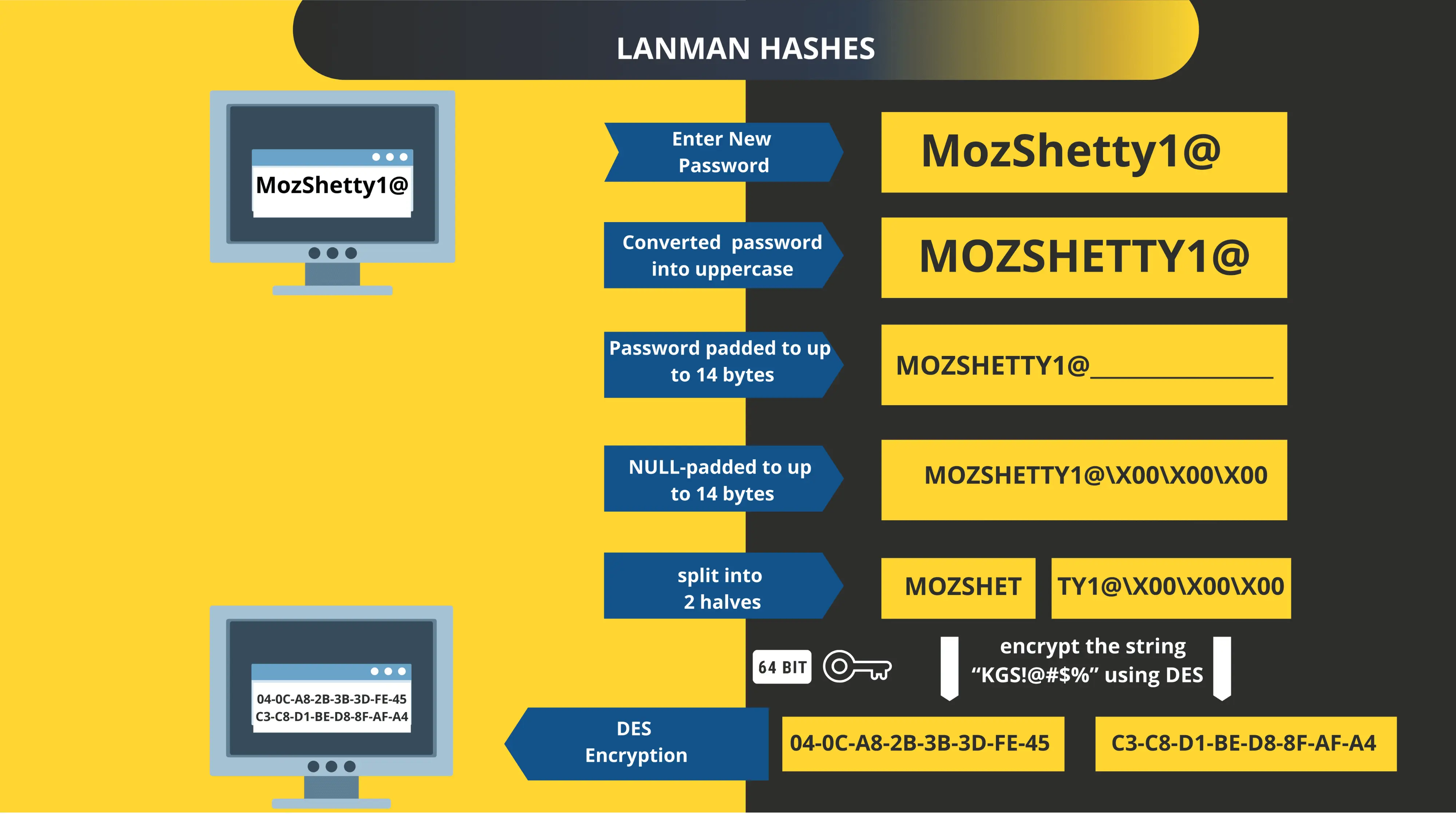
Let us examine how the LANMAN hashing process works.
Example Password
Assume the password is: MozShetty1@
Step 1: Convert to Uppercase
All characters are converted to uppercase.
MozShetty1@ → MOZSHETTY1@
Step 2: Pad Password to 14 Bytes
The password is padded with null characters until it reaches a length of 14 bytes.
MOZSHETTY1@\x00\x00\x00
Here, \x00 represents a null character.
Step 3: Split into Two 7-Byte Chunks
The 14-byte password is divided into two separate blocks.
MOZSHET | TY1@\x00\x00\x00
Step 4: DES Encryption
Each 7-byte chunk is used to create a 64-bit DES key (with parity bits added). These keys are then used to encrypt a constant string:
"KGS!@#$%"
using the DES algorithm in ECB mode.
Step 5: Concatenate Results
The outputs of both DES encryptions are combined to produce the final LANMAN hash.
Example output: 04-0C-A8-2B-3B-3D-FE-45-C3-C8-D1-BE-D8-8F-AF-A4
Weaknesses of LANMAN Hashes
LANMAN hashing has several major weaknesses:
These weaknesses make LANMAN hashes highly vulnerable to brute-force and dictionary attacks.
Modern Windows systems use NT hashes (NTLM) instead of LANMAN hashes. While NT hashes are significantly stronger than LANMAN hashes, they still have certain limitations.
One important limitation is that NT hashes do not use salting, making them vulnerable to precomputed dictionary attacks such as rainbow tables.
Nevertheless, NT hashes preserve case sensitivity and avoid the structural weaknesses present in LANMAN hashes.
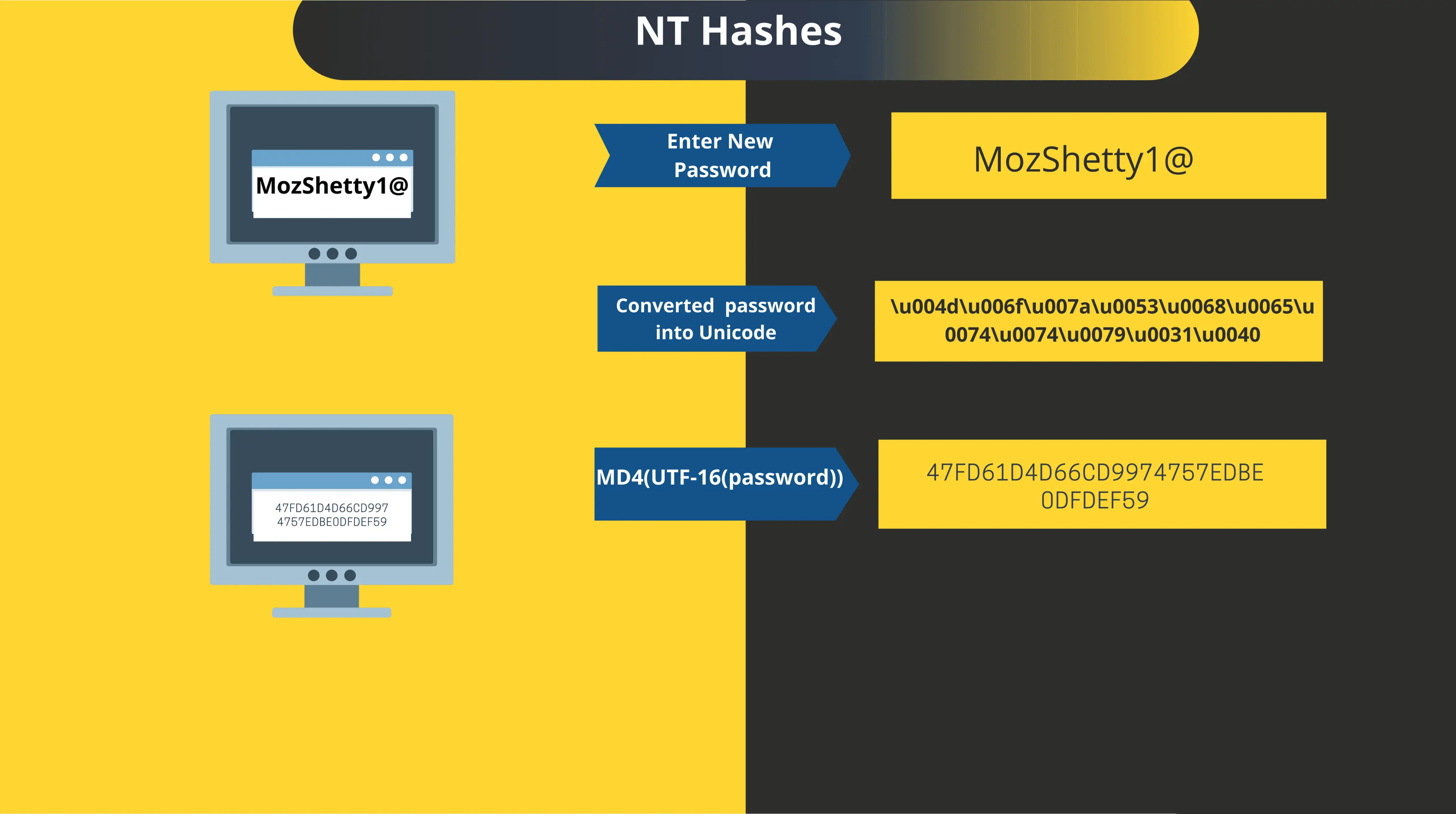
Let us examine how NT hashes are generated.
Step 1: Convert Password to Unicode
The password is first converted into UTF-16 Unicode format.
Example: MozShetty1@
becomes
\u004d\u006f\u007a\u0053\u0068\u0065\u0074\u0074\u0079\u0031\u0040
Step 2: Apply MD4 Hashing Algorithm
The Unicode representation of the password is then hashed using the MD4 algorithm.
MD4(UTF-16(Password))
Step 3: Storage in SAM Database
The resulting NT hash is stored in the SAM database and may be protected using encryption mechanisms such as RC4 or AES-CBC-128.
Compared to LANMAN hashes, NT hashes provide several improvements:
However, because salts are not used, NT hashes remain vulnerable to precomputed dictionary attacks.
One simple mitigation is to use passwords longer than 15 characters, which prevents Windows from generating a LANMAN hash and ensures that only the NT hash is stored.
The Windows authentication process works as follows:
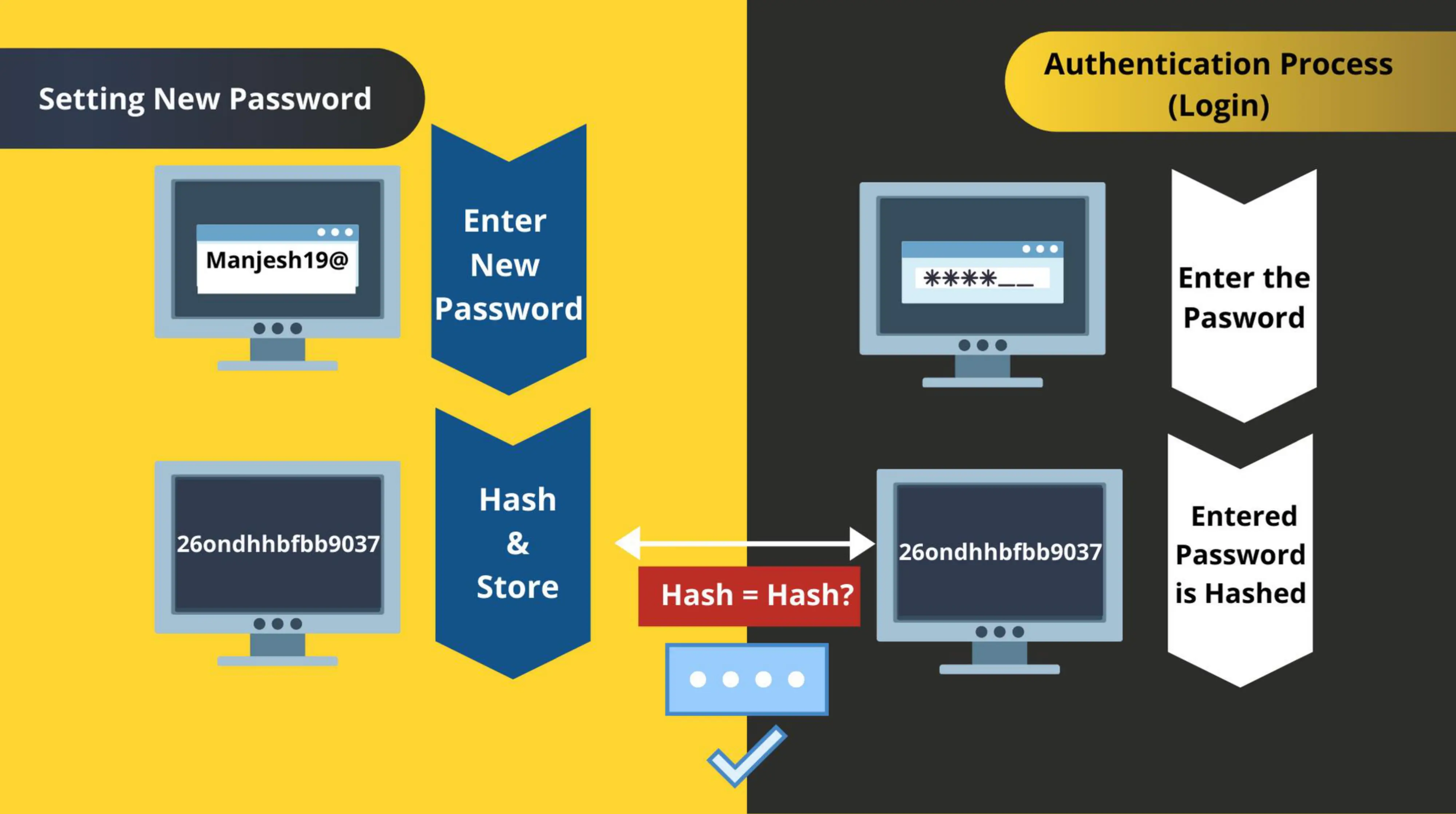
Step 1: Password Storage
When a user creates or changes a password, the system converts the password into a hash value, which is then stored in the SAM database.
Step 2: Login Attempt
When the user logs in, Windows generates a new hash from the entered password. This generated hash is often referred to as HashPrime.
Step 3: Hash Comparison
The newly generated hash is compared with the stored password hash.
Password hashing plays a critical role in protecting user credentials within operating systems. While early mechanisms such as LANMAN hashing introduced significant security weaknesses, modern systems rely on NT hashes to provide improved protection.
However, even NT hashes have limitations due to the lack of salting. This highlights the importance of using strong passwords, modern authentication mechanisms, and additional security controls to protect systems from credential compromise.
Author: Manjesh P Shetty
Operational Office – 4th Floor, NASSCOM Campus, Plot No. 7-10, Sector 126, Noida, UP -201303
In Association

